
Mapping sources: where each funnel step gets its data
Every funnel step needs a data source: the place the numbers come from. Mapping is the link between the two, and it’s defined inside your content rules, so every campaign in a rule’s group inherits the same sources (see Mapping campaigns: content rules and naming conventions).
Available sources in Nexoya Starter
Channel metrics: Metrics delivered directly by your connected advertising channels, such as impressions, clicks, and ad spend. These typically feed the upper funnel steps.
Google Analytics 4: Once GA4 is connected, its full event catalog is available as a source. GA4 events such as sessions, add to cart, purchases, or leads typically feed the lower funnel steps, since they measure what happens on the website rather than on the ad platform.
A single funnel can mix sources freely. A common setup: Impressions and Clicks from the ad channels, Sessions and Conversions from GA4.
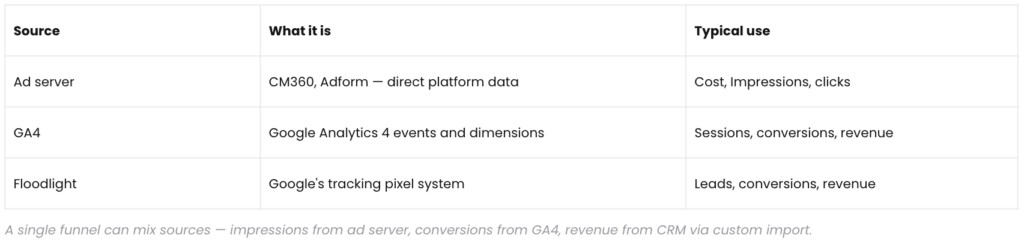
On Nexoya Premium, additional sources are available, including ad server and Floodlight data and custom imports for CRM or offline data.
Example: mapping with GA4
- Connect GA4 in your team’s integrations (see Connecting your data). Nexoya pulls in the property’s event catalog.
- Identify the events that match your funnel steps, for example purchase for Conversions and session_start for Sessions.
- Open the content rule and add the chosen GA4 metrics to the corresponding funnel steps. Every campaign in the rule’s group inherits the mapping.
Checking your mapping
After mapping, open the Performance tab and check that every funnel step shows plausible data.
To see your changes, fetch new measurements and trigger a hard refresh: click “More” in the top-right corner, select “Fetch measurements,” then “Hard refresh.” It may take a moment for the changes to appear.
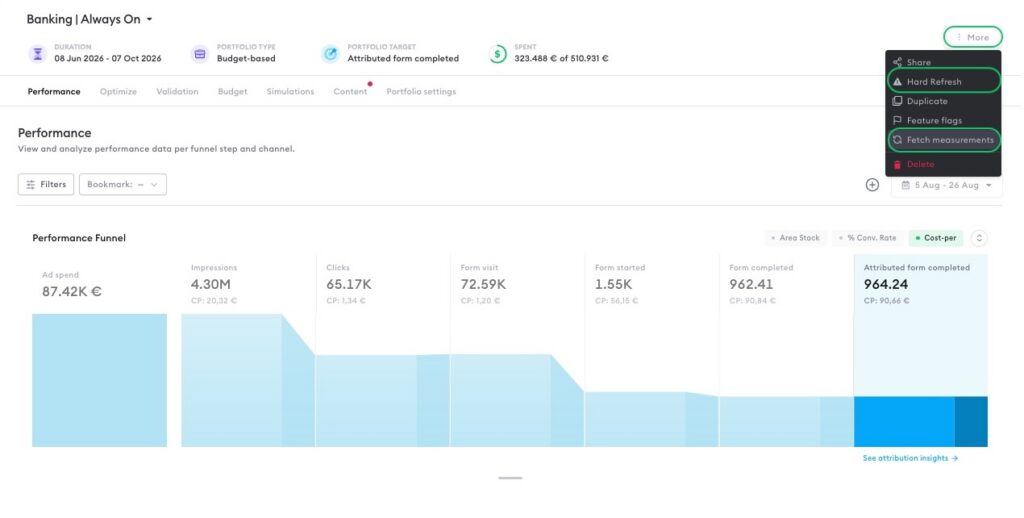
A funnel step showing zero usually means its source isn’t mapped in one or more content rules, or the campaigns feeding it weren’t matched by any rule. Both are visible in the Content tab.
Can’t find the answer to your question?
No problem, you can submit your question to us here.
Contact