
Monitoring budget and KPIs across channels on campaign level
The Budget tab is where you plan your portfolio budget over time and compare the plan against actual spend. In Nexoya Starter, this is a planning and monitoring tool: Nexoya tracks what your channels spend, but never changes it.
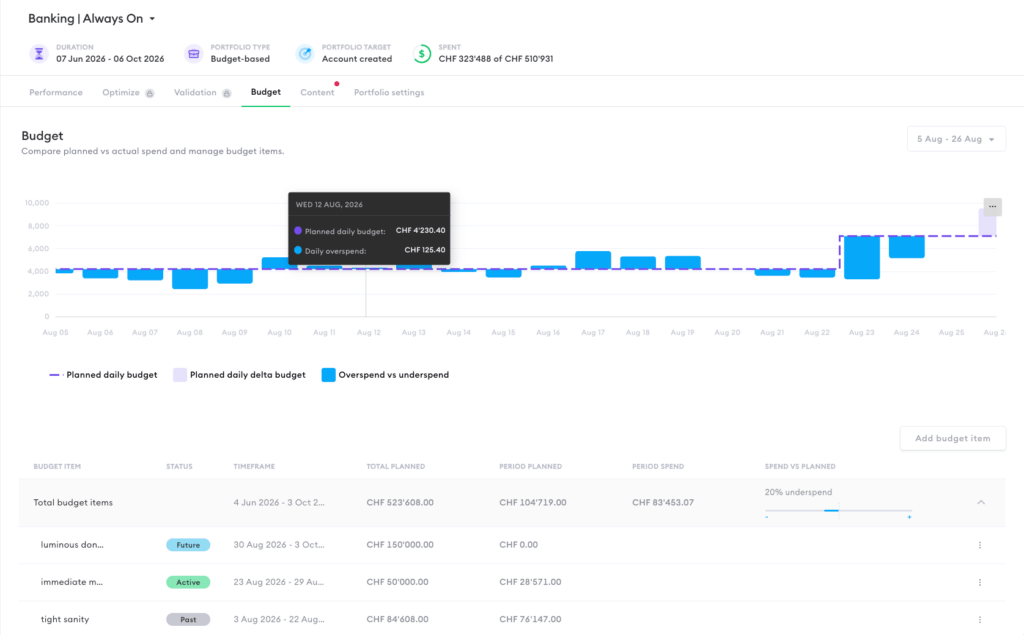
Budget items
Your budget plan is built from budget items. Each item defines how much budget is available for a specific timeframe, for example CHF 50,000 for 24 July to 15 August. Together, your budget items should cover the portfolio duration; their sum is the planned total shown in the portfolio header next to the actual spend.
Each item has a status: Past (timeframe over), Active (currently running), or Future (not started yet). To create one, click “Add budget item” and set the name, timeframe, and amount. Future items can be edited or deleted at any time via the item’s menu; this is how you adjust the plan when a client raises or cuts budget mid-way.
Reading the budget chart
The chart at the top compares plan and reality per day. The dashed line is the planned daily budget, derived from your budget items. The bars show the deviation: where actual spend was above the line (overspend) or below it (underspend). The summary row of the table shows the same at portfolio level, for example “1% underspend” for the selected period.
Keeping plan and spend aligned
Check the Budget tab regularly, especially toward the end of a budget period. A consistent overspend means the channels are pacing faster than planned; a consistent underspend means budget will be left over. In Nexoya Starter, you resolve either by adjusting spend directly on the channels, or by updating the budget items if the plan itself changed.
On Nexoya Premium, this loop is automated: the AI allocates the planned budget across campaigns and channels week by week and applies the changes for you.
Can’t find the answer to your question?
No problem, you can submit your question to us here.
Contact